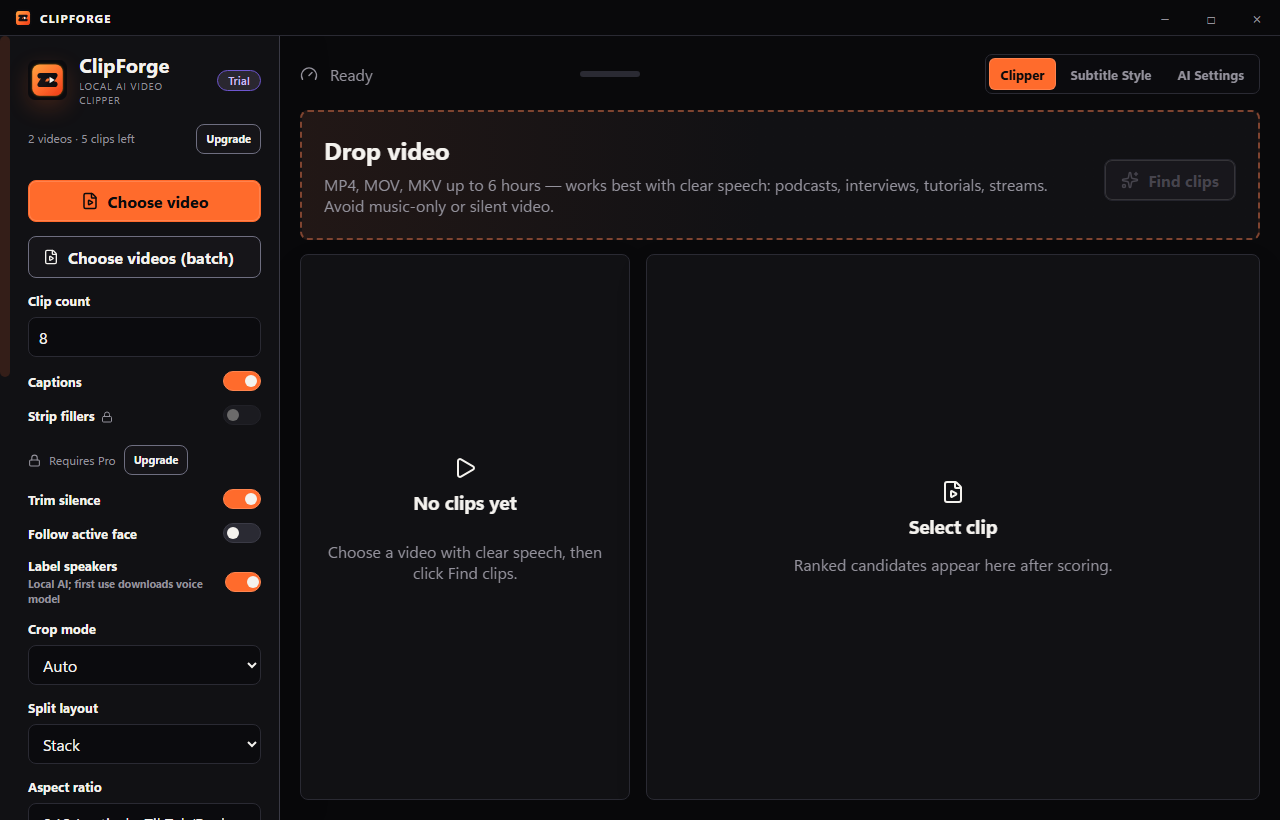
Stop spending hours clipping your long videos. One drop gets your strongest moments ranked.

If you edit podcasts or streams, you know the pain: scrubbing hours of footage for good moments, uploading to cloud tools that watermark everything. ClipForge runs on your Windows PC. Drop any video — 15 minutes or 6 hours — and get ranked vertical clips with captions. Your footage never leaves your machine.

No credit card required for trial. 14-day refund on purchase, no questions. Download begins instantly.

🔒 Runs offline
Handles 6-hour sources
💻 Windows 10/11
No watermark on paid tiers

Built for creators who film long

Every other tool chokes past 60 minutes or uploads your raw footage to a server. ClipForge doesn't.

🎬

Local transcription

faster-whisper runs entirely on your CPU. No video data leaves your machine. The Whisper model downloads once, then works offline.

🎯

Smart ranking

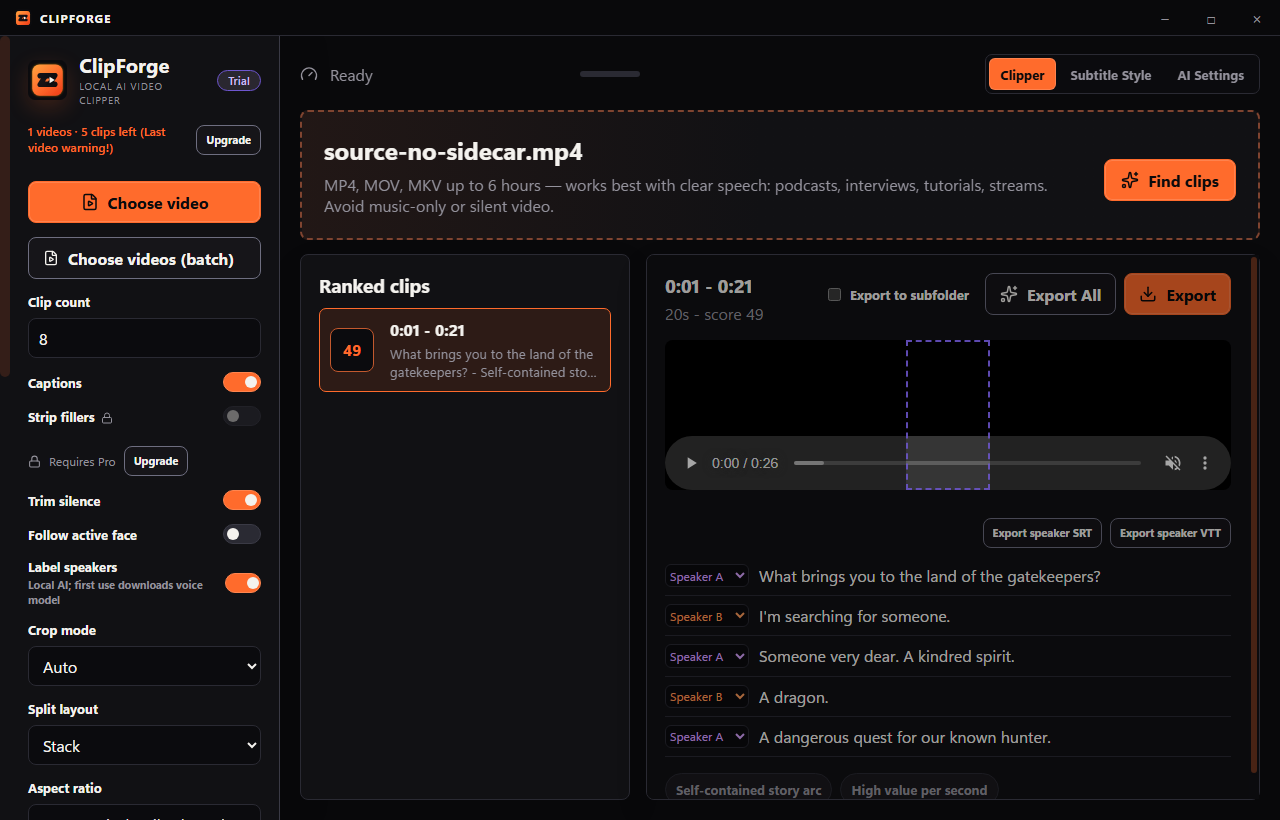
A six-feature heuristic scores every moment on length fit, boundary quality, sentence completeness, hook density, speech rate, and uniqueness. Best clips float to the top.

🤖

Bring your own AI key

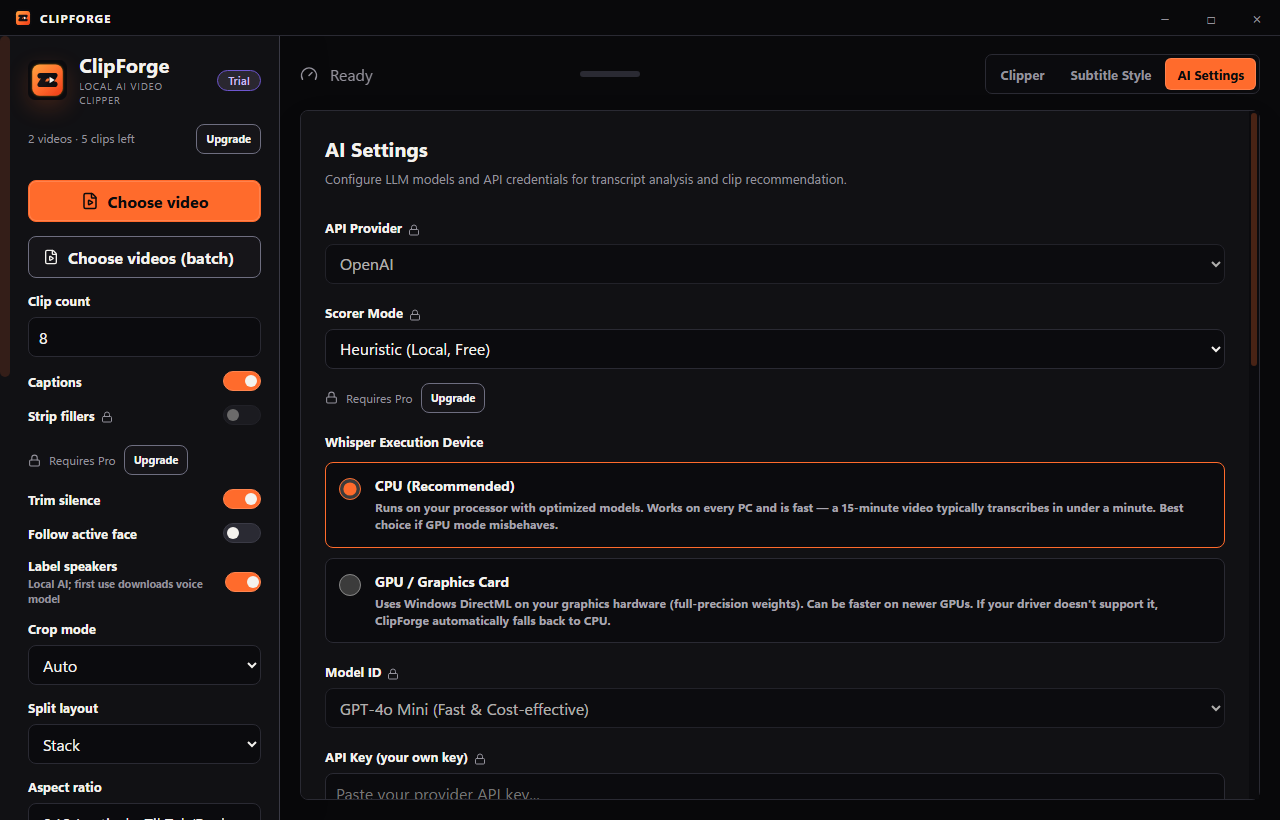
Wire in your OpenAI, Anthropic, Google, or OpenAI-compatible provider key for LLM-powered moment scoring. You pay your provider directly. We never mark up tokens. Available on every tier.

🗣

Karaoke captions

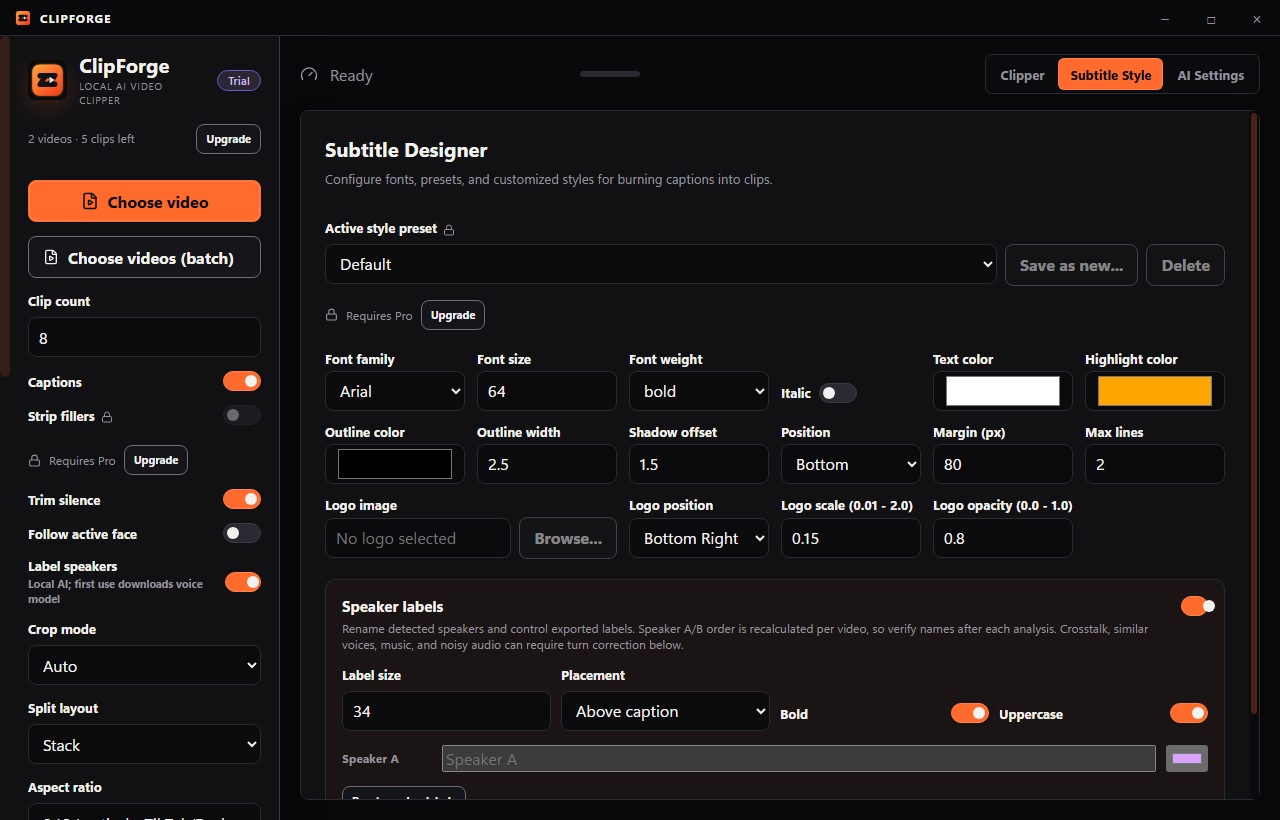
Word-level timed subtitles with yellow highlight on the active word. Clean black outline. 64pt Arial. Looks native on TikTok and Instagram.

🎭

Face-aware crop

Haar cascade face tracking with scene-level cluster analysis. Keeps the speaker centered in the 9:16 frame. Optional. Center-crop is the safe default.

📈

Yield tracking

Built-in benchmark measures usable-clip rate. Grade your own exports A/B/C and track your hit rate over time.

How it works

Four steps from raw video to ranked clips. No account. No upload. No credit card for trial.

1

Drop a video

Drag any MP4, MOV, or MKV onto the window. ClipForge probes the file and extracts audio automatically. Works up to 6 hours.

2

Transcribe locally

faster-whisper runs on your CPU. Timestamped segments appear as they transcribe. Add custom vocabulary for names and jargon.

3

Review ranked clips

The heuristic scorer picks the best moments. Each clip shows its score, timestamps, and rationale. Tick the ones you want.

4

Export vertical clips

ffmpeg renders 1080x1920 MP4s with burned-in karaoke captions. Output lands in Videos\ClipForge\your-video-name\. Post immediately.

See it in action

Real screenshots from a real export — no mockups.

Why ClipForge?

No uploads. No watermarks on paid tiers. No monthly limits on Pro.

🔒

No Watermarks

Paid tiers export completely clean, watermark-free vertical videos ready for publication.

📡

Runs 100% Offline

Keep your footage private. Audio transcription and video rendering happen entirely on your computer.

🔑

Bring Your Own Key

Connect OpenAI, Anthropic, or Google Gemini directly. Pay only the raw API costs with zero markup.

∞️

No Monthly Limits

Pro and Lifetime tiers have unlimited source video minutes. Perfect for multi-hour streams.

↩️

14-Day Money Back

Try ClipForge risk-free. If you're not satisfied, we offer a full refund within 14 days, no questions asked.

💳

No Credit Card Trial

Get started instantly with 60 minutes of source video processing and 15 clips. No credit card required.

Made for podcasters, streamers, and editors

ClipForge solves different problems depending on who you are.

🎙

Podcasters

You record 60-90 minute episodes and need clips for TikTok, Reels, and Shorts. ClipForge finds the best moments, ranks them, and exports vertical clips with captions. No more scrubbing hours of audio.

đŸ“ē

Twitch Streamers

Your VODs run 3-6 hours. Cloud clipping tools charge per minute or cap at 60 min. ClipForge handles long VODs locally. No upload, and no source-minute cap on Pro.

đŸŽĨ

Video Editors

Receive raw interview footage and need highlights fast. Run it through ClipForge — get a ranked list of candidate clips with timestamps and reasons. Take only the best into your NLE. Saves hours.

Simple pricing. No surprises.

Free trial: 60 source-minutes or up to 15 clips, with a small ClipForge Trial watermark. All tiers include local processing and bring-your-own-key AI scoring.

Monthly Annual
Starter
$9/month
$79/yearSave 27%
$6.58/mo
  • 60 min/month source video
  • Unlimited clip exports
  • Heuristic scoring with reasons
  • BYO key for AI scoring
  • Custom vocabulary
  • Karaoke captions
  • No watermark
  • 14-day refund, no questions
Lifetime
$199 once
Only 100 seats
  • All Pro features forever
  • Current major version (0.x)
  • No recurring charges
  • Future 1.x may be separate
Start your free trial — 60 source-minutes, up to 15 clips, no credit card required.

How ClipForge compares

Local processing + BYO API key is unique in the category. No competitor offers it.

Feature ClipForge Pro Opus Clip Pro Vizard Creator Submagic Pro 2short.ai Pro
Monthly price $19/mo $29/mo $29/mo $39/mo $19.90/mo
Monthly minutes Unlimited 300 min 600 min 40 videos 900 min
Max video length 6 hours Not stated 10 hours 5 min Not stated
Runs locally ✓ ✗ ✗ ✗ ✗
BYO API key ✓ ✗ ✗ ✗ ✗
Watermark-free ✓ All tiers ✗ Paid only ✗ Paid only ✗ Paid only ✗ Paid only

Frequently asked questions

Why a desktop app?

Web services cap sources at 60-90 minutes because they pay to store and process your upload. A desktop app has no such constraint. And your raw footage stays on your machine.

What languages are supported?

Whisper supports about 100 languages for transcription. The heuristics and captions are tuned for English. Other languages work but quality varies.

Does it need internet?

Only for first-time model download, license activation, and optional AI scoring. Transcription and rendering work fully offline once the model is cached.

What counts toward the Starter meter?

Source video duration. A 92-minute file uses 92 minutes regardless of how many clips you export. The meter resets on the 1st of each month UTC.

How much does AI scoring cost me?

You pay your provider directly. A 30-minute transcript on GPT-4.1-mini costs under one cent. ClipForge never marks up tokens. If you do not want AI scoring, the heuristic scorer works offline for free.

How do I set up my own AI key?

Go to Settings → AI Scoring in the app and paste your API key from OpenAI, Anthropic, or Google. ClipForge sends transcript excerpts and your request directly to the provider you select; your source video stays on your PC. No key? The built-in heuristic scorer works offline for free.

Are the clips watermarked?

The free trial adds a small ClipForge Trial watermark. Every paid tier exports without watermarks.

Mac or Linux?

Windows only at launch. Mac is planned, no committed date.

Refund policy?

14 days, no questions. Email us from your purchase address.

Can I install on multiple PCs?

Yes, on machines you personally control. Do not share keys with others.

What counts toward the free trial?

60 minutes of source video processing and up to 15 exported clips. The trial ends when either limit is reached. No time limit, no credit card.

Ready to clip your long-form content?

Free trial: 60 source-minutes, up to 15 clips. No credit card. No upload. Windows 10/11.

Try It Free — No CC
đŸ’ŗ No credit card required â†Šī¸ 14-day refund, no questions